
How to Write a Professional Resume: Quick Tips to Impress Hiring Managers
Discover how to write a professional resume that stands out to recruiters with actionable formatting, keyword optimization, and metrics.

So you need to write a resume. It’s not just about listing everything you’ve ever done; it’s about crafting a compelling story that shows a potential employer exactly why you’re the right person for their job. Think of it less as a historical document and more as a high-impact marketing brochure, with you as the product.
Why Your Resume Needs to Work Smarter, Not Harder
Before you type a single word, you need to know what you're up against. Your resume isn't just going to land on a hiring manager's desk. It first has to survive a two-stage gauntlet, and a generic, one-size-fits-all approach is a surefire way to get tossed out.
First up is the robotic gatekeeper: the Applicant Tracking System (ATS). This is software that scans your resume for keywords and phrases from the job description. If your resume uses funky formatting the software can’t parse or lacks the right terminology, it gets rejected automatically. No human ever even lays eyes on it.
The Human Gatekeeper
If you make it past the ATS, you face the human gatekeeper—the recruiter. And this is where things get really tough. You don't have minutes; you have seconds. Your one and only job is to survive the infamous '7-second scan' and give them a reason to keep reading.
The numbers here are pretty stark. In the U.S., a single job opening can easily pull in 180 applicants. To deal with that volume, recruiters have to be ruthless. They'll spend an average of just seven seconds on that first pass to decide if you’re a potential fit. Even if you make the cut, only about 5% of applicants ever land an interview. For a deeper dive into these stats, this analysis of resume statistics is a real eye-opener.
The takeaway is clear: your resume must be designed for both speed and substance. It needs to be easily scannable by software and compelling enough to capture human attention almost instantly.
This means you need to shift your thinking. Don’t just list your past job duties. Instead, strategically sell your ability to solve the company's problems. Every single line on that page should answer the recruiter's unspoken question: "How will this person make my team better?" That simple question is the key to everything that follows.
Choosing the Right Resume Format and Layout
Before you type a single word, you need a blueprint. The format and layout you choose for your resume is that blueprint—it's the structure that holds your entire career story together. Get it wrong, and even the most impressive experience can get lost in a cluttered mess. Get it right, and you make it incredibly easy for a recruiter to see exactly why you're the perfect fit.
Think about the journey your resume takes. It’s not just one person reading it. First, it has to get past the automated gatekeepers—the Applicant Tracking Systems (ATS). Then, it faces the real test: the 7-second scan from a human recruiter. This is where a clean, strategic layout makes all the difference.
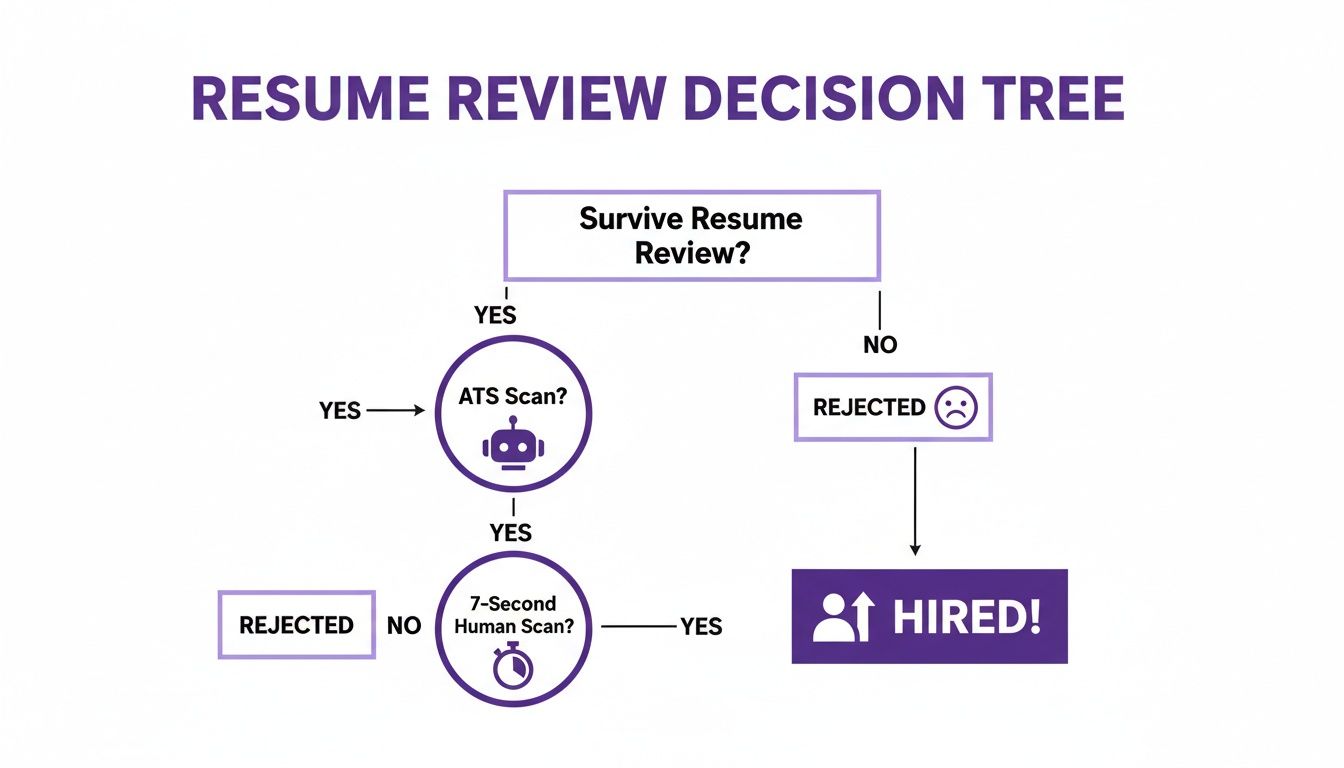
As you can see, the path to getting hired is full of pitfalls. A confusing format is one of the fastest ways to get knocked out of the running.
Picking Your Strategic Format
Your career path is unique, and your resume format should reflect that. The three standard formats aren't just templates; they are strategic choices that highlight different aspects of your professional journey. Choosing the right one is about playing to your strengths.
The table below breaks down the three main options to help you decide which one tells your story best.
Resume Format Selection Guide
| Format Type | Best For | When to Avoid | ATS Friendliness |
|---|---|---|---|
| Reverse-Chronological | Professionals with a steady career path and no major employment gaps. It’s the industry standard for a reason. | If you're making a significant career change or have noticeable gaps in your work history. | Excellent. This is the format ATS software is built to understand perfectly. |
| Functional | Career changers, recent graduates with limited experience, or people with long employment gaps. | If you have a solid work history. Recruiters can become suspicious, thinking you're hiding something. | Poor. ATS often struggles to parse skill-based sections and can't connect them to a timeline. Use with caution. |
| Combination (Hybrid) | Experienced professionals, specialists, or those in technical fields where specific skills are paramount. | Early-career professionals who don't have enough experience to warrant a detailed skills summary. | Good. As long as it's followed by a clear, chronological work history, most ATS can handle it well. |
For the vast majority of people, the Reverse-Chronological format is the safest and most effective bet. It’s what recruiters know and expect, and it’s what the software reads best. The other formats are tools for specific situations, but they come with risks.
The Hybrid format is my personal favorite for experienced pros. It gives you a powerful opening to showcase your top skills right away, then backs it up with the solid, traditional timeline that recruiters need to see.
Mastering a Clean and Readable Layout
Once you’ve picked your format, you need to focus on readability. I’ve seen countless resumes with incredible experience get tossed simply because they were a visual nightmare. Fancy fonts, tiny margins, and crowded columns don't impress recruiters—they annoy them.
Remember, both software and humans need to be able to scan your resume quickly and easily. Stick to these fundamental layout rules:
- Keep Your Design Simple: A single-column layout is your best friend. Multi-column layouts can confuse ATS parsers, causing them to jumble or completely miss important information.
- Choose a Professional Font: Stick with classics like Calibri, Arial, or Verdana. Your font size for body text should be between 10 and 12 points—anything smaller is a strain to read.
- Give It Room to Breathe: Use margins of at least 0.7 inches on all sides. That white space isn't wasted; it makes the page feel less intimidating and guides the reader’s eye through the content.
Making Each Resume Section Count
Once you've settled on a format, it's time to get into the real meat of your resume. This is where you build the engine, section by section. Think of it less like filling out a form and more like telling a compelling story about your career and the value you bring. We're going to transform those standard resume sections from simple lists into powerful arguments for why you're the right person for the job.
This isn't just about what you say, but how and where you say it. Let's start from the top—your first, and best, chance to grab a recruiter's attention.
Your Professional Summary: The Hook
You’ve probably heard this before, but it bears repeating: recruiters spend an average of just seven seconds on their first scan of a resume. That means the top third of the page is prime real estate. Your professional summary is your elevator pitch, and it has one job: to make them want to keep reading.
A weak summary is generic and sounds like a dozen others. A strong one, however, is a concentrated shot of your top skills, biggest wins, and qualifications, all tailored to the role you’re targeting. It’s the trailer for the movie of your career.
A good formula to get you started looks something like this:
- Sentence 1: Kick off with your professional title and years of experience.
- Sentence 2: Zero in on 2-3 key skills or achievements that mirror the language in the job description.
- Sentence 3: Connect your career goals directly to this company or role.
This structure keeps it punchy and ensures you land your most important points before their eyes move on. It’s a skill that serves you well beyond the resume; for more on that, our guide on how to introduce yourself professionally has some great tips that are just as useful here.
Let’s look at the difference it makes.
- Before: Hardworking and dedicated project manager looking for a new opportunity to contribute to a team.
- After: Certified Project Manager with 8+ years of experience leading cross-functional teams to deliver complex software projects on time and under budget. Proven expertise in Agile methodologies and risk mitigation, resulting in a 15% increase in team efficiency. Eager to apply strategic planning skills to drive successful project outcomes at Innovate Corp.
See the difference? The second example is packed with specifics, data, and a clear connection to the employer's potential needs.
Transforming Your Experience Section
This is the heart of your resume, and it's where most people fall into a common trap: they just list their job duties. A hiring manager already knows the basic responsibilities of a "Sales Manager." What they need to know is what you accomplished in that role.
The big shift you need to make is from listing responsibilities to showcasing results. You weren't just "responsible for managing social media." You "grew organic social media engagement by 45% in six months by implementing a new content strategy."
To do this, frame every single bullet point as an accomplishment. Start with a strong action verb and, wherever you can, back it up with numbers, percentages, or other concrete outcomes.
Think of it this way: a duty is what you were supposed to do. An achievement is proof that you did it well. Your resume should be a collection of proofs, not a list of assignments.
Here’s another example of this transformation.
- Before:
- Responsible for client communications.
- Handled customer support tickets.
- Worked on improving team workflow.
- After:
- Orchestrated a proactive client communication strategy, improving client retention by 20% year-over-year.
- Resolved an average of 50+ customer support tickets daily with a 95% satisfaction rating.
- Spearheaded the adoption of a new project management tool, reducing project completion time by 10%.
The "after" version tells a story of impact. It uses dynamic language and hard data to show, not just tell, what you can do.
Positioning Your Education And Skills
While your work history usually gets top billing, the education and skills sections provide crucial backup. Where you place them depends on where you are in your career.
For recent graduates or anyone with less than five years of experience, it makes sense to put your education section right after the professional summary. It highlights your most recent, relevant qualifications. If you’re a seasoned pro, however, this section usually finds its home at the bottom of the resume.
Your skills section needs to be a curated list, not a brain dump of every software you've ever touched. Scour the job description and pull out the skills they mention most often—those are the ones you want to feature.
How to Organize Your Skills
| Skill Category | Example Skills | Why It Works |
|---|---|---|
| Technical Skills | Python, SQL, Google Analytics, Salesforce | These are the hard skills an ATS is most likely scanning for. Be specific. |
| Industry-Specific | SEO/SEM, Content Marketing, A/B Testing | This shows you know the specific tools and techniques of your trade. |
| Soft Skills | Team Leadership, Public Speaking, Negotiation | These are vital, but it's even better to demonstrate them within your achievement bullet points. |
Finally, don't be afraid to add optional sections like Certifications, Projects, or Volunteer Experience if they're relevant to the job. For someone changing careers or in a technical field, a strong project can speak louder than an old, unrelated job title. Every single piece of your resume should serve one purpose: to prove you're the best candidate for this specific role.
Mastering Keywords and Quantifying Your Impact
To get your resume past the initial screening and into the hands of a real person, you need to play a two-part game. First, you have to satisfy the resume-scanning robots—the Applicant Tracking Systems (ATS). Then, you have to immediately convince the human recruiter that you're worth their time.
The way you win this game is by mastering two things: speaking the right language with strategic keywords and proving your value with hard numbers.

When you get this right, your resume stops being a simple list of past jobs and becomes a powerful argument for why they should hire you. It’s all about showing what you’ve accomplished, not just telling them what you did.
Decode the Job Description for Your Keywords
Think of every job description as a cheat sheet. It’s literally a list of the exact words and skills the company is looking for, and it's what both the ATS and the hiring manager will use to judge your application. Your job is to become a bit of a detective.
Pull up the job description and start highlighting every key term you can find. Don't overthink it at first—just pull out the important stuff.
- Hard Skills: These are the technical abilities they need. Look for software names (Salesforce, Python), methodologies (Agile, SEO), or specific job functions (data analysis, project management).
- Soft Skills: These are the interpersonal traits that show how you work. You'll see phrases like "team leadership," "cross-functional collaboration," or "strategic planning."
- Action Verbs: Pay attention to the verbs they use, like "develop," "manage," or "analyze." Mirroring their language helps create an instant sense of fit.
Once you have your list, carefully weave these keywords into your professional summary and your work experience bullet points. The key is to make it sound natural—don't just stuff them in. They should be part of the stories you tell about your achievements.
The Power of Putting Numbers to Your Achievements
Here’s what separates a good resume from a truly great one: quantification. Numbers are your best friend because they provide undeniable proof of your impact.
A vague statement like "Improved team efficiency" is nice, but it's forgettable.
Now, compare that to: "Reduced project timelines by 15% by implementing a new workflow automation tool." That’s a powerful, specific achievement that sticks in a recruiter's mind. It shows not just what you did, but the real-world result of your work.
This is where people often get tripped up, especially if they're not in a sales role. They think, "My job doesn't really have numbers." I promise you, it does. You just have to know how to find them.
Your goal is to translate your daily responsibilities into the language of results. Think in terms of time saved, money saved, processes improved, or customer satisfaction increased. Every job contributes to these core business metrics in some way.
How to Find the Metrics in Any Role
Let's get practical. No matter your job title, you can find quantifiable results by asking yourself the right questions.
For Efficiency and Productivity
- How many tasks did you handle per day or week? Did you find a way to increase that number?
- Did you create a new process that saved time? How many hours per week did it save?
- Did you simplify a common procedure? By what percentage did you reduce the steps?
For example:
- Instead of: Trained new team members.
- Use: Developed an onboarding program that cut new hire ramp-up time from 4 weeks to 2, boosting team productivity by 25% in the first quarter.
For Cost Savings
- Did you negotiate a better contract with a vendor? How much money did you save the company?
- Did you spot an inefficiency that cut operational costs? By what percentage?
- Did you manage a budget? Did you come in under budget?
For example:
- Instead of: Managed office supply inventory.
- Use: Renegotiated vendor contracts for office supplies, securing annual cost savings of $15,000 without sacrificing quality.
The data backs this up completely. Research consistently shows that resumes with hard numbers—like percentages and dollar amounts—can increase your chances of getting an interview by as much as 40%. Yet, shockingly few people do it; some studies suggest that only 8% of resumes contain meaningful metrics. You can find more insightful resume statistics on Resume-Now.com.
By quantifying your achievements and aligning your language with the job description, you instantly place yourself in that top tier of candidates.
Final Touches and Avoiding Common Resume Mistakes
You’ve poured hours into crafting a resume filled with impactful achievements and the right keywords. Awesome. But before you fire it off, there’s one last, crucial step: the final review. A single, careless mistake can completely undermine all that hard work, so don't skip this part.
This isn't just about a quick spell-check. It's your last chance to make sure your resume is polished, professional, and perfectly tuned for the specific job you’re applying for. Honestly, the little details here often separate the candidates who get a call from those who don't.
The Non-Negotiable Proofreading Pass
Your resume must be 100% error-free. There's really no wiggle room on this. Even a small typo or grammatical slip can signal a lack of attention to detail, which is a major red flag for pretty much any hiring manager.
Don't just lean on your word processor’s spell-checker. It’s a good starting point, but it will absolutely miss context errors, awkward phrasing, and words that are spelled correctly but used in the wrong way (like "manger" instead of "manager").
Here's how to really get it right:
- Read It Aloud: This feels a bit strange at first, but it’s a game-changer. Reading your resume out loud forces you to slow down and makes you hear clunky sentences or weird phrasing you’d otherwise skim over.
- Use a Second-Gen Tool: Programs like Grammarly or the Hemingway Editor are fantastic for catching the sneaky stuff—passive voice, overly complex sentences, and subtle grammar issues.
- Get a Fresh Pair of Eyes: You've been staring at this document for hours. Your brain will start auto-correcting mistakes. Ask a trusted friend, a former colleague, or a mentor to give it a once-over. They will almost always spot something you missed.
A resume with even one or two typos can be seen as a direct reflection of your work ethic. Spending an extra 10 minutes to get it perfect is probably the highest-return activity in your entire job search.
Tailoring Your Resume in Under 15 Minutes
I see this all the time: people sending the exact same resume to every single job posting. It’s one of the biggest mistakes you can make. While you don’t need to rewrite the whole thing from scratch every time, a little customization goes a long way.
And it doesn't have to take forever. Here’s a quick-and-dirty method to tailor your resume for a specific role in just a few minutes:
- Swap Keywords in Your Summary: Reread the job description, paying close attention to the "Requirements" or "What You'll Do" sections. Pull out the top 2-3 skills they mention and make sure those exact words appear in your professional summary at the top.
- Reorder Your Bullet Points: Look at your most recent role. Shuffle your bullet points so the accomplishments most relevant to the new job are listed first. Recruiters scan top-down, so put the good stuff where they can’t miss it.
- Adjust Your Skills Section: Tweak your skills list to mirror the language in the job post. If they ask for "content strategy," use that phrase instead of "content planning." It’s a small change that helps you get past the automated screeners.
This targeted approach instantly shows the hiring manager that you've actually read the job description and are genuinely interested in their role, not just blasting out applications to anyone and everyone.
Avoiding Common Recruiter Pet Peeves
Having seen thousands of resumes, I can tell you that recruiters have a list of common blunders that can get you moved to the "no" pile in seconds. Steer clear of these.
- An Unprofessional Email Address: Your email should be a simple, professional variation of your name, like
FirstName.LastName@email.com. That old, cringey email from your high school days? It kills your credibility instantly. For more tips, check out our guide on professional email writing examples. - Irrelevant Personal Details: Never include your marital status, age, religion, or a photo (this is standard practice in the U.S. and many other countries). This information is irrelevant to your qualifications and can introduce unconscious bias.
- A Generic File Name: Don't just save your file as
resume.pdf. A recruiter is juggling dozens of applications. Make their life easier with a clear file name likeJane-Doe-Resume-Project-Manager.pdf. - Formatting That Breaks the ATS: Stick to clean, single-column layouts and standard, easy-to-read fonts. Fancy templates with tables and graphics can get mangled by Applicant Tracking Systems. Before you finalize everything, quickly review these critical ATS CV mistakes to avoid so your resume actually makes it to a human.
Before you hit "send," give your resume one last look-over using this checklist. It's a simple way to catch the small things that can make a big difference.
Resume Pre-Submission Checklist
| Check Area | What to Look For | Why It Matters |
|---|---|---|
| Proofreading | Typos, grammatical errors, inconsistent formatting. | Even one error can make you look careless and unprofessional. |
| File Name | Is it generic (Resume.pdf) or specific (YourName-Role-Resume.pdf)? | A specific name helps the recruiter stay organized and looks professional. |
| Contact Info | Correct phone number, professional email address, and working LinkedIn URL. | You don't want them to be unable to reach you because of a typo. |
| Tailoring | Do the summary, skills, and bullet points reflect the job description? | Shows you're genuinely interested and not just spamming applications. |
| ATS Compatibility | Are you using a standard font and a clean, single-column format? | Ensures the software can read your resume correctly without scrambling it. |
| Length | Is it a concise 1-2 pages? | Recruiters spend only seconds on the first scan; keep it focused. |
By running through this final review, you can feel confident that the resume you’re sending is a flawless, powerful, and strategic document that truly represents your best self. Good luck
Answering Your Toughest Resume Questions
Even after you've done all the hard work, a few tricky questions can pop up when you're putting the final touches on your resume. Getting these details right can make all the difference.
Let's cut through the noise and tackle some of the most common things that trip people up.
How Long Should a Resume Be?
For almost everyone, the answer is a straightforward one page.
Think of it this way: a recruiter might only give your resume a six-second glance initially. A single, powerful page forces you to be ruthless about what’s most important, ensuring your biggest wins are front and center. It respects their time and shows you can communicate concisely.
The main exception? If you're a seasoned pro with 10-15+ years of directly relevant experience, a two-page resume is perfectly fine. Just don't ever let it spill onto a third page.
Should I Put a Photo on My Resume?
In places like the U.S., Canada, and the UK, the answer is a hard no.
Including a photo can open the door to unconscious bias, and companies work hard to create a hiring process that’s fair and objective. Recruiters are trained to screen for skills and experience, not what you look like. Let your qualifications do the talking.
Your resume is a professional document, not your social media profile. The entire point is to land an interview based on what you can do for the company. A photo only distracts from that goal.
What File Format Is Best?
Unless the application specifically demands something else (like a .docx), you should always send your resume as a PDF.
Why? Because a PDF locks in your formatting. The beautiful layout, fonts, and margins you spent time on will look exactly the same on the hiring manager’s computer as they do on yours. It’s the safest bet for maintaining a professional look.
And a quick pro tip: name your file something clean and obvious, like "FirstName-LastName-Resume.pdf". It’s a small detail that makes life easier for the person on the other end.
How Do I Handle an Employment Gap?
First, don't panic. Employment gaps happen for all sorts of reasons—family, health, travel, or just a needed break—and they’re far more common than people think.
The key is to handle it with honesty and a bit of strategy. You don't need to write "Took time off to travel" on your resume. Just list your employment dates accurately.
If you were doing something productive during that time, you can absolutely highlight it.
- Further Education: Did you take courses or get a new certification? Create a "Professional Development" section.
- Volunteer Work: If you gained valuable skills while volunteering, list it just like you would a paid job.
- Freelance & Personal Projects: Showcasing significant projects proves you were still honing your craft.
Be ready to talk about the gap confidently in an interview. Frame it as a period of growth or personal responsibility, then quickly steer the conversation back to why you're the perfect fit for the job now. If you need help preparing for those conversations, our guide on job interview preparation tips is a great place to start. For those navigating the global job market, combining a strong resume with excellent communication is crucial, and there are excellent resources for international job seekers that offer targeted support.
Ready to speak with the confidence you need to ace your next interview? TalkEasy uses AI-powered conversation practice to help you sound more natural and prepared. Start building practical fluency in just 15 minutes a day at https://www.talk-easy.com.